
Examples
ANSI Colors
The input file is a plain UTF-8 text file. To colorize text, use the same ANSI escape sequences you would use in a terminal. Three color depths are supported — here is how to select red as a foreground color in each:
- [91 — bright red from the 16-color palette (4 bit)
- [38;5;9 — intense red from the 256-color palette (8 bit)
- [38;2;255;0;0 — red as an RGB value (24 bit)
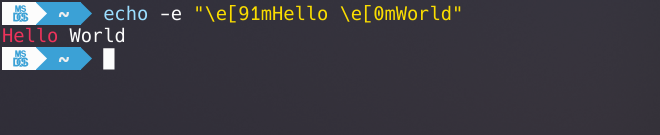
Multiple sequences can be combined in a single line to style individual words. The following line, for instance, highlights the severity in bright red and the metric value in bright white while keeping the rest in gray:
“[91CRIT[38;5;248: Disk Space Usage ([9796%[38;5;248)[0”
The provided example file in the docs folder uses this technique to build a small alarm dashboard:
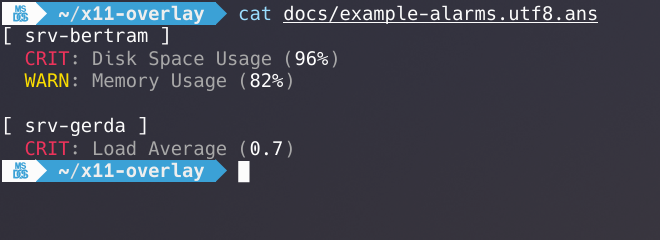
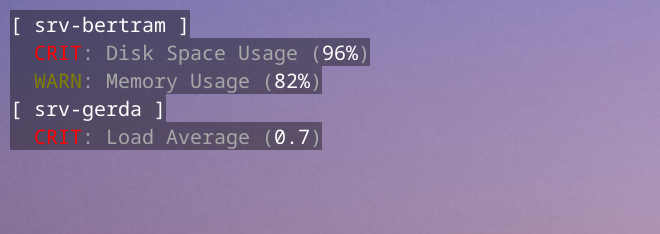
What you see in the terminal is exactly what x11-overlay renders on your desktop:
./x11-overlay \
    docs/example-alarms.utf8.ans
Font Selection
Fonts are rendered using the FreeType rasterizer, so any font installed on your system can be used. To find the correct name for a font, query fontconfig (linux / osx):
$> fc-list | grep -i "IBM"
/usr/local/share/fonts/m/Mx437_IBM_VGA_8x16.ttf: Mx437 IBM VGA 8x16:style=Regular
The name reported by fc-list — here Mx437 IBM VGA 8x16 — is the value
to pass to the -f / --font-name option. The following command
renders the project’s ANSI logo with a classic IBM VGA font:
./x11-overlay -f "Mx437 IBM VGA 8x16" docs/logo.utf8.ans
Fonts that support the CP437 character set work particularly well for classic ANSI art. A good source for such fonts is int10h.org.
Alternative Fonts
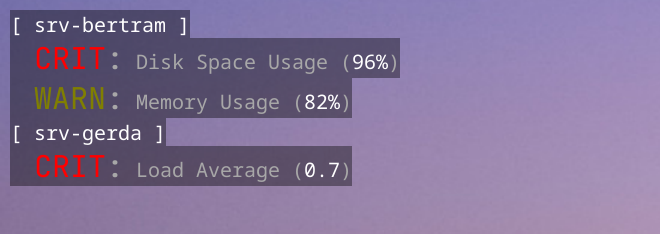
The primary font and size are set with the -f / --font-name and -s / --font-size options. Up to ten font slots (0–9) can be defined by passing comma-separated lists. Within the input file, the ANSI sequences [10 through [19 switch between these slots, and [10 resets back to the primary font.
The following command assigns JetBrainsMono at size 18 to font slot 1:
./x11-overlay -f NotoSansMono,JetBrainsMono -s 12,18 \
    docs/example-alarms.utf8.ans
Because NotoSansMono and size 12 are already the built-in defaults, the first entry in each list can be left blank. The command below produces the same result — note the leading commas:
./x11-overlay -f ,JetBrainsMono -s ,18 \
    docs/example-alarms.utf8.ans
Config File
All command-line arguments can also be provided through a config file in INI format. The previous font example is equivalent to the following example-alarms.ini:
InputFile=docs/example-alarms.utf8.ans

[Positioning]
Orientation=SW

[Font]
Name=NotoSansMono,JetBrainsMono
Size=12,18
./x11-overlay -c example-alarms.ini